#101 随机字符串碰撞概率分析
开发者 2026-04-21在设计邀请码、一次性授权码等场景时,通常会使用较短的随机字符串。
随机字符串越短,用户输入越方便,但碰撞风险也会显著上升。因此,长度设计本质上是在“可用性”和“唯一性”之间做平衡。
假定采用一个 Base32 字符集(A-Z 2-7),分析在每天生成 10,000 个随机字符串时,不同长度下的碰撞风险。
coding in a complicated world
在设计邀请码、一次性授权码等场景时,通常会使用较短的随机字符串。
随机字符串越短,用户输入越方便,但碰撞风险也会显著上升。因此,长度设计本质上是在“可用性”和“唯一性”之间做平衡。
假定采用一个 Base32 字符集(A-Z 2-7),分析在每天生成 10,000 个随机字符串时,不同长度下的碰撞风险。
博客文章 Steve Hanov's Blog 《How I run multiple $10K MRR companies on a $20/month tech stack》介绍,他运行多个月收入1万美元公司的技术栈以极简和高性价比为核心,每月总成本控制在20美元左右。在极低成本下实现高可用的创业项目,避免过早引入复杂架构和巨额云账单。
PS:其实没有计算一次性购买 GPU 的费用,以及开发工具 GitHub Copilot 的月费。
以下是其技术栈的详细总结:
| 类型 | 选型 | 价格 | 说明 |
|---|---|---|---|
| 服务器 | Linode / DigitalOcean | $5–$10/月 | 选用廉价可靠的虚拟私有服务器。单台服务器(1GB RAM)足以支撑初期业务,并通过swap文件扩展内存。 |
| 后端语言 | Go | 免费 | 静态编译为单一二进制文件,部署简单(直接scp到服务器),性能高、内存占用低,且易于LLM理解和维护。 |
| 本地AI推理 | VLLM(RTX 3090 GPU) | 一次性投资约$900 | 利用本地GPU进行批量AI任务(如文档分析),配合Ollama快速测试模型,Transformer Lab进行微调。 |
| LLM服务 | OpenRouter | 按请求付费(未透露) | 统一接入Claude、ChatGPT等前沿模型,提供OpenAI兼容接口,并支持自动故障转移(如某服务宕机时切换至其他模型)。 |
| 开发工具 | GitHub Copilot(VS Code) | 约$60/月 | 按请求计费而非按token,可长时间运行复杂代码重构任务而成本固定(约$0.04/请求),性价比高于专用AI IDE。 |
| 数据库 | SQLite | 免费 | 单文件数据库,启用WAL(Write-Ahead Logging)后支持高并发读写,性能优于远程PostgreSQL,适合初创业务。 |
| 部署方式 | scp(安全复制) | 免费 | 将Go编译的二进制文件直接复制到VPS运行,无需容器化或复杂CI/CD,简化运维。 |
| 前端建议 | htmx | 免费 | 博客评论中推荐使用htmx实现轻量级前端交互,避免重型框架。 |
PS:需要执行 AI 任务的时候,线上服务调用作者本地机器进行 GPU 计算(可能是搞了一个 VPN)。
PS:开启 WAL 模式之后,SQLite 的并发性能会有很大提升。(SQLite WAL 模式)
自研库:
| 类型 | 库 | 说明 |
|---|---|---|
| 身份验证库 | smhanov/auth | 自研的轻量级认证库,直接集成SQLite等数据库,支持用户注册、会话管理、密码重置及第三方登录(Google、Facebook、X、SAML)。 |
| AI代理工具 | smhanov/laconic | 针对受限上下文窗口(如8K)优化的代理研究工具,通过“分页”机制管理LLM上下文,保留关键信息以处理长对话。 |
| LLM抽象层 | smhanov/llmhub | 将本地或云端的LLM统一抽象为简单的provider/endpoint/apikey组合,简化文本和图像IO的调用。 |
shortuuid 是 Python 的短 UUID 库,将标准 UUID 转换为更短、URL 安全、易读的字符串,默认使用 Base57 字符表,并排除 l、1、I、O、0 等易混淆字符。适合用于数据库 ID、API Key、URL 参数等用户可见的非连续 ID。
brew 执行命令的时候总是提醒这个:
Adjust how often this is run with HOMEBREW_AUTO_UPDATE_SECS or disable with
HOMEBREW_NO_AUTO_UPDATE. Hide these hints with HOMEBREW_NO_ENV_HINTS (see `man brew`).
关闭自动更新:环境变量中添加:
export HOMEBREW_NO_AUTO_UPDATE=1
忽略提示:环境变量中添加:
export HOMEBREW_NO_ENV_HINTS=1
调整更新频率:环境变量中添加:
# 改成每周一次
export HOMEBREW_AUTO_UPDATE_SECS=604800
我就是在 ~/.zshrc 文件中添加:
# brew 自动更新配置
# 自动更新时不在终端打印提示信息
export HOMEBREW_NO_ENV_HINTS=1
# 频率每周检查一次
export HOMEBREW_AUTO_UPDATE_SECS=604800
手动更新:
# update brew
brew update

# upgrade all installed packages
brew upgrade
马尔科姆·格拉德威尔的“一万小时定律”指出,持续投入一万小时的努力,足以使人在某个领域达到专家水平。按照每周 20 小时的练习量计算,每天大约需要投入 3 小时,十年左右才能达成这一目标。
从我写下第一行 C 代码算起,至今已超过十年。期间,我编写了超过三十万行代码,其中一部分在微信编写的代码,曾服务过超过一亿的用户。
尽管写了这么多代码,我仍不敢自诩为专家。但多年的“打工”生涯,日复一日地敲代码,也让我积累了不少感悟。“工多艺熟”,这些感悟既是对编程技术的思考,更是对职场人生的体味。毕竟,除了最初在学校学习的几年,我的编程生涯几乎都伴随着“打工”的酸甜苦辣(多是苦辣)。
虽然大学是从 C 语言入门编程的,但是我在大学时主修的语言是 Java,毕竟 Java 是门非常成熟的工业语言,有非常丰富的框架,在国内的企业非常受欢迎,工作岗位也多。
我当时从 JavaServlets 入门 Web 开发,再学习了非常流行的 JavaEE 企业开发框架 SSH,即 Structs2+ Spring+ Hibernate,Struct2 负责控制逻辑关系,Spring 负责解耦,Hibernate 负责操作数据库。
而到我开始找工作时,SSH 的概念就变了,Struct2 被 SpringMVC 所取代,SSH 变成了 SpringMVC+Spring+Hibernate。
到我实习入职蚂蚁金服的时候,发现组里代码库操作数据库的 ORM 框架用的并不是 Hibernate,而是 Ibatis,后面又切换成了新的 MyBatis
而蚂蚁金服内部使用的也并不是 Spring/SpringMVC,而是自主研发出发的 Sofa 框架,Spring 社区后来觉得 Spring 框架过于重量级,不利于快速开发,又开发了更轻量级的 SpringBoot,而蚂蚁内部又推出了 Sofa 版本的 Sofaboot
去了微信支付后,前期都是在写 C++,使用微信内部自研的 svrkit 框架,到后期因为负责数据治理相关项目的缘故,开始使用 Spark + Python + HiveSQL
现在在 AWSS3,因为业务对性能和资源使用有非常高的要求,又开始使用 Rust,而历史业务又是使用 Java,兜兜转转之后,又回到 Java 的路子上。
细数下来,这些年来,我写过 Java、C++、Python、Rust、Javascript/Typescript 这些语言的生产代码。
除去工作之外,我还因为学习 SICP 学习了 Scheme,因为使用 Emacs 而学习了 EmacsLisp,想做独立开发赚钱学习了 Swift,想感受 RubyonRails 的魅力而学习的 Ruby,还有以前为了压测写的 Golang,还有各种语言对应的框架和库。
自我学习编程以来,学过的编程语言没有 10 种也有半打了。
我也从来不会把自己定义为某门语言的程序员,如 Java 程序员,C++ 程序员等等,我只叫自己做 Software Development Engineer。语言从来只是工具,只要你持续学习,遇到新的场景,自然就会学习新的编程语言了。
计算机的世界日新月异,可能几个月就会出个新框架,几年又会流行一门新语言,只有持续学习,才能持续保持自己的竞争力。
领袖常说,「东升西降」,虽然不知道此种变化何时才能实现,但起码说明,目前是「西尚在上,东尚在下」,在计算机领域,尤其如此。
最前沿的技术都是英文资料,英语又是世界通行的语言,来自不同国家的开发者又会不约而同地使用英语来交流,因此学好英语既可以了解最新的技术潮流,又可以融入社区,建立自己的影响力。
疫情之后,越来越多的公司都开始推行远程办公,从全世界招聘开发者。这就意味着如果你英文过硬,甚至可以离开一线城市,避免高额的生活开销,在老家工作,陪伴在父母身边,同时赚取外汇;这对于饱受 996 困扰的程序员来说,未尝不是一条出路。
于我个人而言,坚持学习英语可能是我收获最大的投资之一。
熟悉我的朋友,尤其是我的高中同学可能知道,十年以前,我的英文可以说着实挺烂的:满分 150 分的英语,只考个及格的 90 分可谓是家常便饭,后来也只会笨学英语,到高三的时候能考个 120 分已经是巅峰水平。
但上大学之后,我也没有就此懈怠放下英语,大一还每天去晨读英语。
没有口语交流的条件,就自己创造,去网上找人聊天,当时还在一个叫 Interpals 10 聊天网站认识了全世界好多的人,其中还有一个是年龄相仿的土耳其女孩,我们还加了 Facebook,经常用 Skype 视频聊天。
大学毕业后就没有那么多的时间闲聊后就断了联系,最近看 Facebook 的动态,看她也穿上婚纱了。
工作后也一直阅读英文的技术文章,用英文搜索内容,在 Stackoverflow 和 GitHub 用英文回答问题,在 Discord 的英语学习频道找人聊天,把电脑和手机系统语言都换成英文的,从学习英语变成用英语。
后来在机缘巧合之下,从国内找到了加拿大 AWS 的工作,幸而有机会来加。
人们常说,路应该要越走越宽,而不是越走越窄;
而在我看来,英语就是夜里走路时手上拿着的手电筒,可以让我们走自己的路的同时,扫一下旁边那条道的情况,需要时及时转向,不至于一条路走到黑。
微信以前一直有发最新 iPhone 手机的传统,但是那已经是 4 年前的美好时光了。
记得 2021 年是小龙明确年会不会发手机的第一年,他当时透露,那一年会发个铝片。
当时同事之间还在讨论,iPhone 也是一块铝片冲压而成的嘛,那发的是否还是 iPhone 呢,不发手机只是烟雾弹?
拆开年会礼物之后发现,的确是一块铝片,上面写着「2022 保持独立思考」。
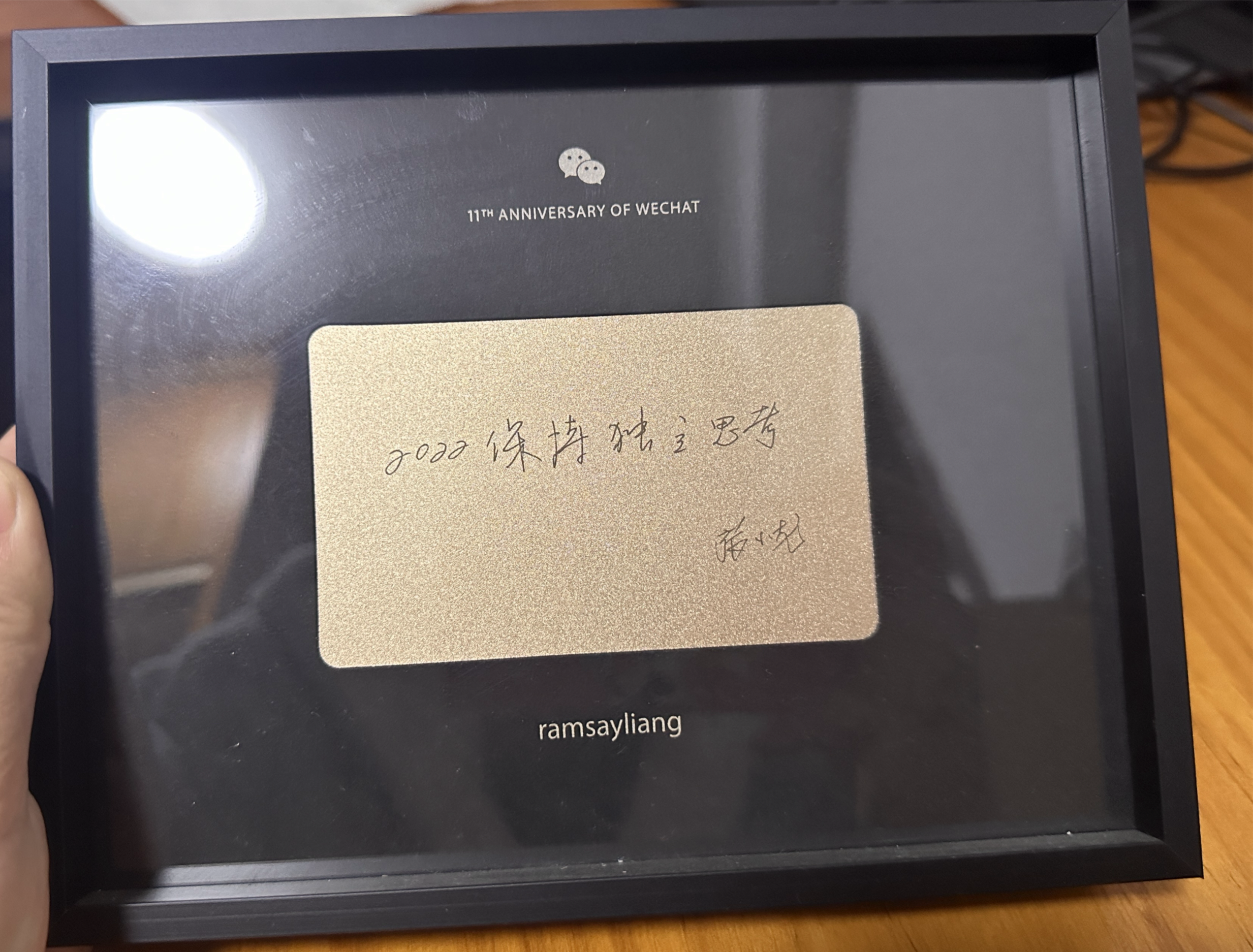
小龙一直强调「独立思考」对微信的重要性,认为如果要选择一个最重要的品质,他会选择「独立思考」。
上级说的不一定是对的,老师说的不一定是对,学术机构说的也不一定是对,媒体说的也不一定是对,声音大的更不一定是对,毕竟有理不在言高。
比如微服务架构非常流行,许多公司都在搞微服务,那么单体架构是否就应该不使用?
作为初创公司或小团队,新业务是否要上微服务架构呢?还是先使用单体架构,业务发展起来再迁移到服务呢?
开发过程免不了要做各种决策,比如技术选型,针对你的需求,你可能会找到一打「看似」符合要求的组件,可能还会去网上找找对各个组件的评价,会发现众说纷纭,就需要自己独立对每个组件做出分析,找出其优劣,再结合自身团队的特点,做出决策。
关于独立思考,我最喜欢的是一句话是 HBO 出品短剧《切尔诺贝利》里面,科学家瓦列里·列加索夫希望克格勃释放调查真相同事乌拉娜·霍缪克的要求,说可以保证她是没问题的,克格勃头子回答的那句话:
Trust,butverify。(相信,但要核实)
这句话还有一个广为人知的变种:「又不是不能用」
很多的程序员都是完美主义者,尤其是读过《重构》和《设计模式》的程序员,会倾向于把很多时间来优化代码,做重构。
以前的我也会有类似的冲动,总会想时间去优化代码,但是项目肝多了之后,有种强烈的感觉,还是先把 MVP 上线,及早让用户体验。
如果没有用户使用,再好再漂亮的代码也没有任何意义了。
所以经常看到社区有人问做副业的时候,应该用什么语言和框架,PHP/Python/Ruby 会不会太慢,我的观点一直都是,先做个原型跑起来,先找到第一个用户再说。
当运行速度成为瓶颈时,你的业务已经非常大,肯定有足够的钱可以招一打的程序员把你的项目换成 Golang/Java 了。
对此,我很赞同坐我旁边大佬关于代码质量的说法:
make it run,make it fast,make it beautiful。
最近在做副业的尝试,有个深刻的体会,技术可能是商业里面最不重要的。
从零把产品做出来,推广给用户,用户只会关注你的产品是否好用,能否解决他们的问题。
他们既不会关注你是用 C++/Java 还是 Javascript 写的,也不会关注你代码写得是否优雅,与其执着于技术选型,不如先把产品干出来让用户试用。
经常会看到有人在社区提问,什么语言最好,什么框架最好,什么编辑器最好,什么操作系统最好。
「最好」是个相当主观的结论,也并没有针对所有场景的「最好」的解决方案,但是经常能看到社区有人因为哪个语言更好而吵起来。
或者有人在分享 A 的时候,有人会在下面回复 B/C/D 更好,然后又争吵起来。
让不禁让我想起《社会性动物》这本著名的社会心理学著作里面提到的团队认同现象,当球迷与某支球队产生强烈的认同感后,会将球队视为自我认同的一部分,这里他们会:
如果有人问我这个问题,我会回答「你顺手熟悉的工具的最好」。
即使是出于乐趣,编程的目的还是利用计算机解决问题,而解决问题最好的工具就是你最熟悉的工具。
除非你了解的工具不适用于你的问题,那么自然就需要一个新工具,也不要削足适履,矫枉过正。
当然,如果是为了满足求知欲而想去学习一个新的语言,那选择你感兴趣的就可以了。
当初在 2017 年学习 Rust,也只是因为大四没有课,时间充裕,想学点有趣的新东西,那时候 Rust1。0 才发布 2 年,可没指望能靠 Rust 找到工作
记不清在哪里看过的一段话:
我也曾问过自己类似的问题:
- 是不是好的东西就能流行?不一定
- 是不是我喜欢的东西就是好的东西?不一定
- 我会不会花时间精力在一个不一定会流行但是我喜欢的东西上?会
程序员固然是和机器打交道,但是本质解决的还是人的问题。
当初学习编程的时候,曾经有个误区,认为自己只要把技术搞好,就可以不去关心什么「人情世故」。
因此初入职场之后,我既是这么持有这样的想法,又是这样行动的,虽然不至于对其他人冷脸相对,但是难免会如好友形容那般:「孤傲」
但是被毒打时间久了才会发现,无论是在国内或国外,都难免会有「人情世故」,用英文来说,那叫 network and connection。
即使我技术能力过硬,也需要被人见到才行,和同事领导相处关系好,才可以在做出成绩的时候,「花花轿子被众人抬」。
所以我现在都是有事没事都和同事们聊天,既可以提升下熟悉度,也可以了解到许多部门八卦,还可以从同事们抱怨中找到潜在优化点,践行自己「Work hard and be nice to people」的理念。
这行做久了,会发现软件工程其实说到底,就是人的系统工程。
程序写多了之后就会有种幻觉,就是觉得什么事情都可以用代码来解决。
手里拿着锤子的时候,把什么都当成钉子来砸。
被毒打多才认清的事实就是,有很多事情是无法用代码来解决,代码只是个工具,只能在个合适的场景使用,避免路径依赖。
酒香也怕巷子深,只会写代码没啥用,还要写文章,在公司内部做分享,让别人能「看到你」。
编程肝项目的专业能力固然重要,但是也要有营销自己的软实力,就像一位长者说的那样:两手抓,两手都要硬。
不知道是中国人讲究谦虚内敛的品质,还是程序员「木讷呆板」的刻板印象,导致大家都不怎么营销自己。
有事没事和老板聊下天,增进下交流,经常露个脸,可能比肝十个项目还有用。
从业多年,去过蚂蚁金服,微信支付和 AWS 搬砖,和各种各样的同事都共事过,有个越发强烈的感悟:
要与优秀的人共事
不仅能从他们身上学到非常到的优点,提升技术能力,可以学到最佳实践和工程经验,在 Code Review 的时候可以学到更好的编程方式,遇到问题时又有靠谱的队友帮忙和指导。
由优秀的程序员开发出来的系统的独特之处,知道什么叫简单好用的系统,形成自己的技术品味。
品味与美感这个词是很抽象,但是用过了好用的系统,自然就不会对那些粗制滥造,还靠老板背书强行推广的系统感兴趣。
而提高技术品味在提高我们的技术认知的前提下,又能反过来帮我们提高设计能力。
和优秀的同事共事的另外一个好处是可以建立高质量的人脉网络,利于职业发展,跳槽换赛道也多个选择。
虽然初始公司也有优秀的开发者,但是平均而言,大公司优秀程序员的比例会更高,毕竟他们更有竞争力的薪资福利,自然也有更高的招聘门槛。
比如微信就有所谓的面试委员会,除了招聘部门的面试官之外,还要通过面委面试官的考核,避免为了快速招人而降低标准。
所以个人建议应届毕业生,有机会还是去大公司,见识下。
虽然离职微信快两年了,我仍然想念当初同组共事的同事们,他们真的是技术过硬,人又超 nice,还乐于帮忙。
正如孔子所言:与善人居,如入兰芷之室,久而不闻其香,则与之化矣;与恶人居,如入鲍鱼之肆,久而不闻其臭,亦与之化矣
编程这么多年,落下一堆的职业病。
大学时候就有的鼠标手(腱鞘炎),工作几年之后「喜提」腰椎间盘突出,久坐下半身会麻痹,还有我曾经浓密黝黑的头发,现在也日渐凋零。
因为腾讯总部有免费的健身房,所以我基本工作日都会去健身房薅公司羊毛,2 天有氧慢跑,2 天无氧器械,坚持了快 3 年。也开始注意自己的饮食,尽量少油少糖不喝酒。
健身虽然不是包治百病,但是起码人显得有精神了,也有精力应付高强度的工作了。
只有失去才会懂得珍惜,也真的只有在开始吃药,去医院复诊,才会开始注意身体。
虽然编程很有趣,虽然养家很重要,但是还是要注意身体,毕竟身体是一切的本钱,垮就没有其他的精彩故事了。
无论是编程,还是其他的技能,我感觉都是「马太效应」,你学得越多,你懂得越多,再学新的东西,你就会学得越快。
代码写多了才意识到,程序员的竞争力并不是写代码,也并不是哪门语言或者框架,其核心竞争力是通过技术解决问题的能力,又何必再去拘泥于哪门具体的编程语言或技术呢。
希望编程十年只是个起点,十年后可以再写一篇「编程二十年的感悟」
金句:
你顺手熟悉的工具的最好
只有失去才会懂得珍惜,也真的只有在开始吃药,去医院复诊,才会开始注意身体。
代码写多了才意识到,程序员的竞争力并不是写代码,也并不是哪门语言或者框架,其核心竞争力是通过技术解决问题的能力,又何必再去拘泥于哪门具体的编程语言或技术呢。
产品经理的职责就是三件事:
(1)了解用户需求;
(2)提出解决方案;
(3)安排任务执行。
竞品调研 + 需求管理:确保产品方向与市场需求保持一致。
最熟悉业务流程的人 + 团队沟通的桥梁:在技术、业务和市场之间平衡各方利益,负责进度跟进与协调资源,推动产品的顺利落地与持续优化。
下面这些点都说到我的心里去了。
我这些年的工作大部分时间和精力都是在开发和维护这种长期项目(比如内部核心业务系统,也可能是官网、CRM 对接、或者一些其他的内部系统,不论产生的价值究竟如何,这些项目都算是长期运行的)。
长期项目的人员流动问题,可能有离职,或者职务变动需要将工作转交给新人接手。
这个过程中,之前一些被忽视的点就能体现出价值来了:日志,测试,文档,培训。
然后就是很难被有效评估的“代码质量”,也就是我一直说的,要 “编写可维护代码”,代码架构清晰,逻辑分层,尽量减少依赖。
https://www.ruanyifeng.com/blog/2024/12/weekly-issue-331.html
On Long Term Software Development
https://berthub.eu/articles/posts/on-long-term-software-development/
有些领域的软件会持续运行几十年,比如发电厂、起搏器、飞机、桥梁、重型机械的软件。它们可能几年都不会改动,然后推出一个新的大版本。
如果一个软件的开发周期长达几十年,需要长期维护,那么最好做到下面几点。
尽量减少依赖
软件的依赖项越多,长期越难以维护。依赖包括开发时依赖和运行时依赖,都是越少越好。
现在,很多软件在运行时会调用云服务,这也不利于长期维护。
完备的测试用例
测试对于重构、删除/添加功能,会提供极大的帮助。当你中断 3 年后,重新开始开发,测试也会让你快速了解系统。
减少复杂性
复杂性是软件开发的头号敌人,会让最好的程序员和团队都铩羽而归。
由于熵增定律和人类行为,除非你有意识地遏制,否则复杂性总是会增加。
因此,你需要养成严格的开发习惯:尽早和频繁地重构,删除不必要的或重复的代码,花时间简化。
编写简单无趣的代码
代码越简单越好,重点是代码的运行逻辑要显而易见。你永远不会后悔编写了简单的代码。
那些看上去很聪明、很高深的代码,会让后期的调试和理解变得复杂。特别注意那些高性能代码,只有当你正确理解它们时,它们才有效。
另外,那些眼下时髦、被热炒的明星技术,如果没有得到充分验证,也需要规避。
你最好只使用至少有 10 年历史的可靠技术。有一条规则是,某项技术的寿命与它们当前的年龄成正比,即存在越久的东西越可能继续存在。
日志、遥测和文档
如果软件不是持续更新,开发者的注意力就会转到其他地方,不会立即跟进,所以需要有日志和遥测,能把运行过程记录下来。
文档则可以帮助我们理解几年前、甚至十几年前,编写原始代码时的想法。可能的话,记录所有事物,不仅仅是代码,还有理念、想法和为什么。
团队
团队人员变化是很常见的。在许多地方,在一个团队呆三年,就已经很久了。虽然你可以用良好的文档和出色的测试,来抵消这种人员变化,但这很困难。
软件长寿的最简单办法之一,就是让开发成员长期稳定,保持工作十年。这意味着,你必须给你的程序员提供良好待遇,否则人们会离开。
在某些地方,软件是外包公司或咨询顾问写的,他们将代码丢到你的系统中后离开。对于长期运行的软件,这是非常糟糕的安排。
开源
让你的代码暴露在外界的眼光,是保持代码可靠的好方法。一个有趣的事实是,只有质量良好的代码,人们才愿意对外分享,也就是说,如果不开源,人们会愿意在组织内部接受质量更差的代码。
开源代码有更高的标准、更多的测试,这是让代码不过时的绝佳机制。